

Construction QA, sorted.
The Lot register, ITPs, approvals and conformance reports for your civil projects — captured once, in one place, and compiled the moment they're required.
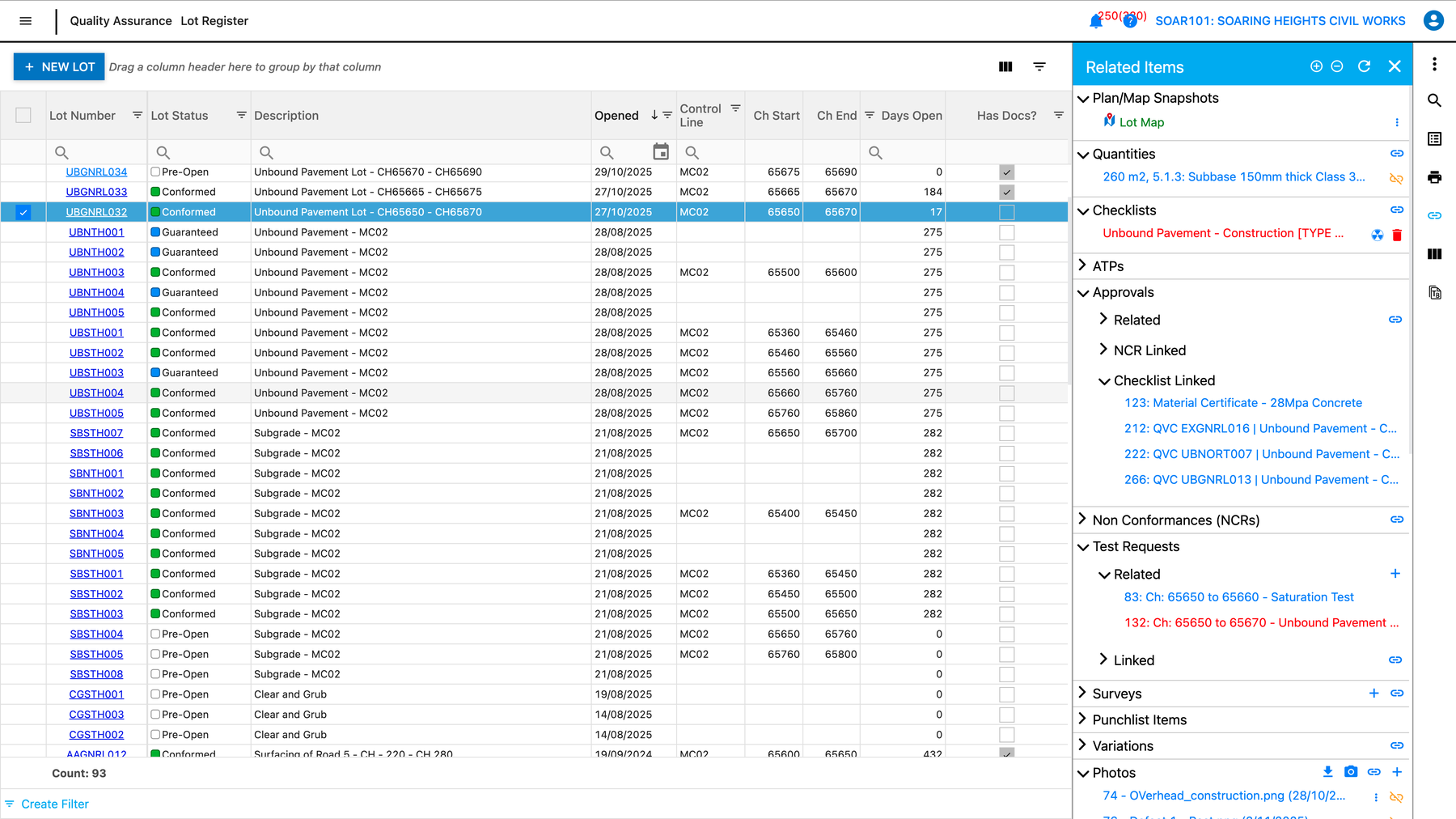
- Cloud Lot register with your project QA linked to every Lot
- Hold Point & Witness Point approvals signed off in-app
- Lot Conformance Reports generated in one click
Trusted by the contractors building Australia & New Zealand












Built for the way you deliver civil works
CivilPro runs the same Lot-based QA spine for every team — how you use it depends on the seat you sit in.
Get off the spreadsheets
Replace the Excel Lot register, Word ITPs and email approvals with one system your whole team works from.
See how →One QA standard at scale
Every project, business unit and joint venture running the same way, with the record open to the systems the rest of your business runs.
See how →Visibility & complete records
See QA while works are happening. Hold complete records once they're done — in-house crews and contractors alike.
See how →Structured handover data
Records update into Aconex or Teambinder as construction progresses, so handover arrives as a structured deliverable you can depend on.
See how →Invited to CivilPro by a contractor? Subcontractors & Inspectors · Clients & Superintendents
Everything revolves around the Lot
Tests, surveys, approvals, checklists, NCRs — all centralised and tied to a Lot. That's what makes CivilPro civil-specific, not a generic form builder.
Create a Lot
Define the work by chainage, coordinates or drawing markup. Assign work types, area codes and quantities.
Add a checklist, complete QA
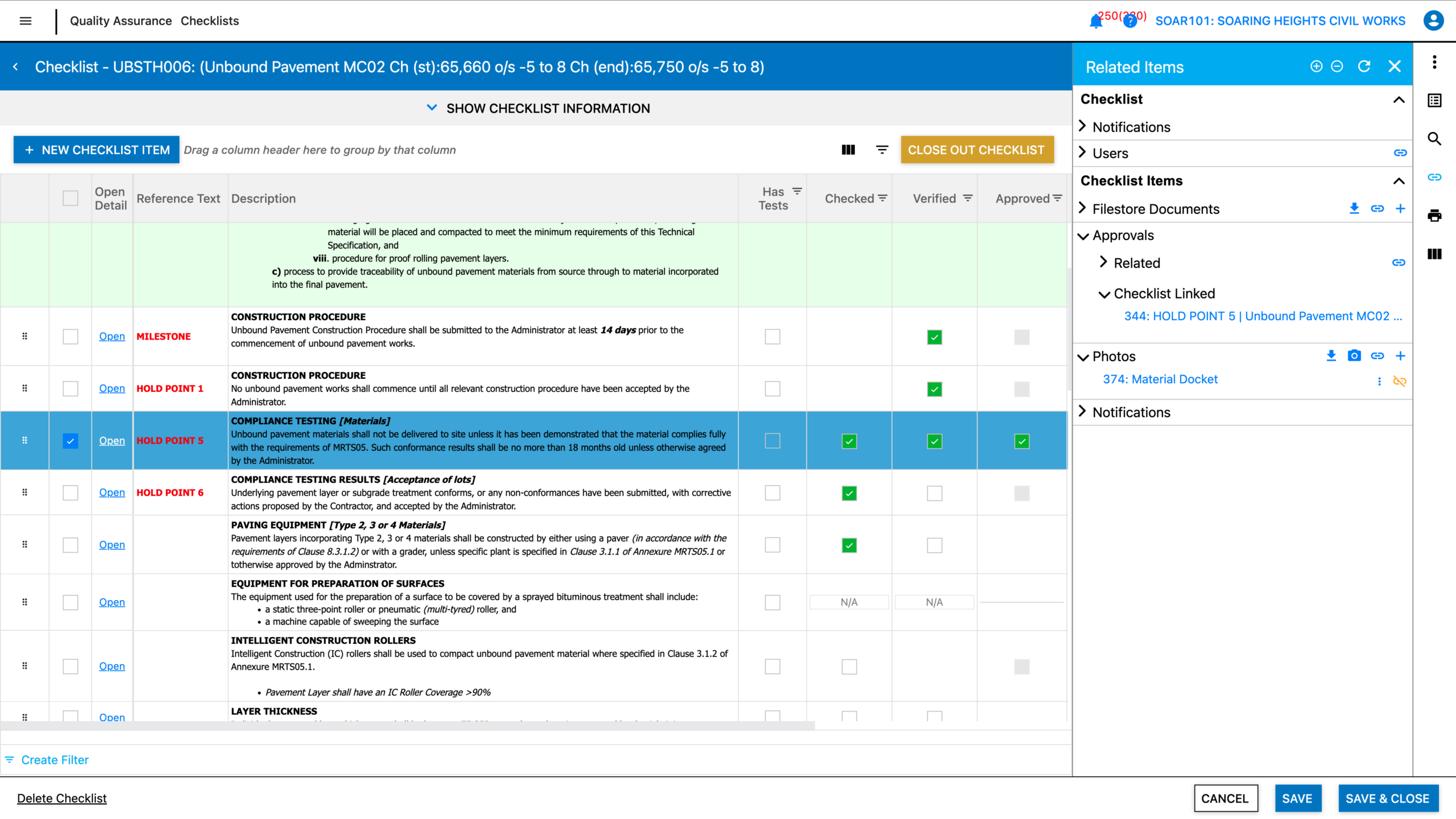
Digital ITPs generate checklists for paperless field completion. Hold Points notified and approved in-app.
Conform, review, export
One click compiles the checklists, tests, photos and sign-offs into a clean, auditable Lot Conformance Report.
The same Lots pay the claim
Payment and cost are part of the plan, not a separate product. Once a Lot is conformed, the quantities behind it are already substantiated — so the claim builds off the QA you have done rather than a second set of numbers.
Progress Claims
Auto-populated from conformed Lots and approved quantities, ready for prompt payment.
Daycosts & Site Diaries
Labour, plant, materials and subcontractor capture, recorded in the field as the work happens.
Forecasting
Cost to date and cost to complete before month-end, not thirty days after it.
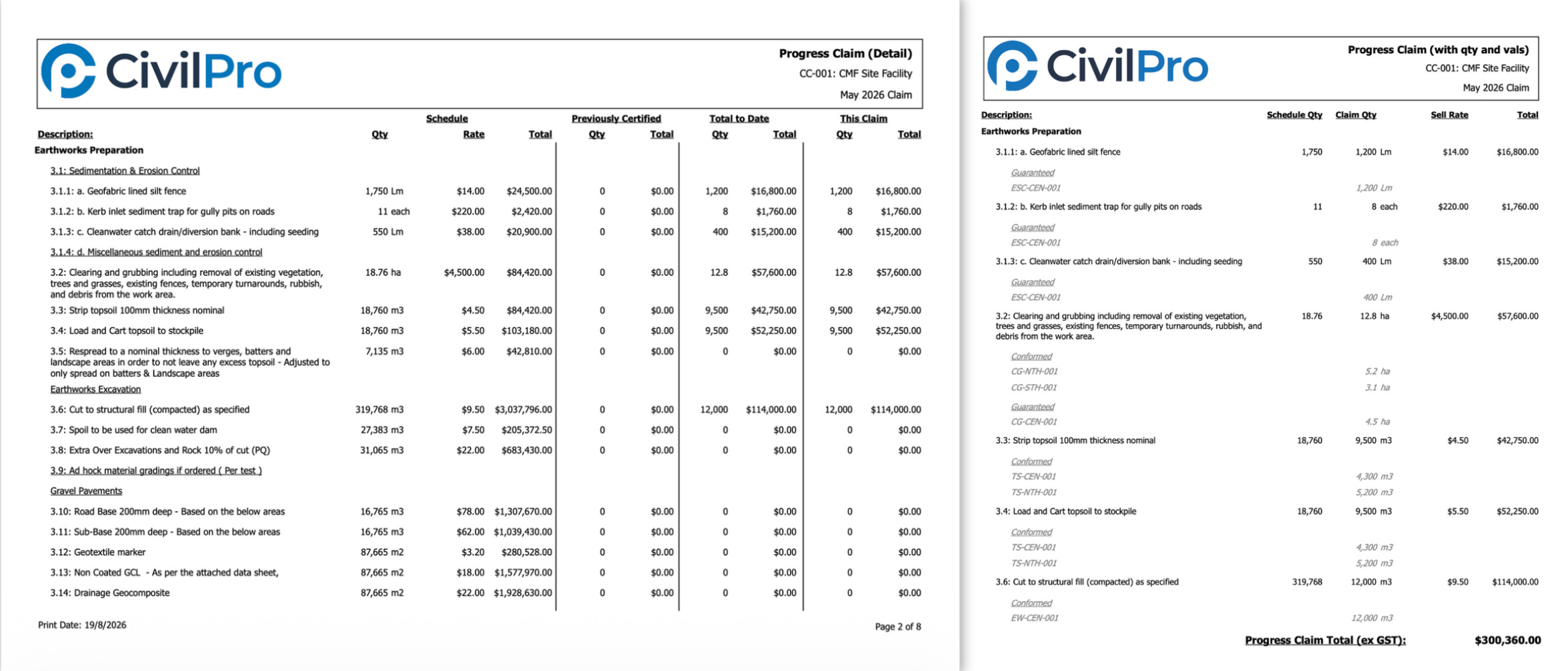
Because all three are captured in the same place, the forecast is built from what site actually recorded. Strongest fit for contractors running claims without an ERP or finance system, and for TMR-style measured works. Included either way, with nothing to upgrade to.
Approvals your Client can action from anywhere
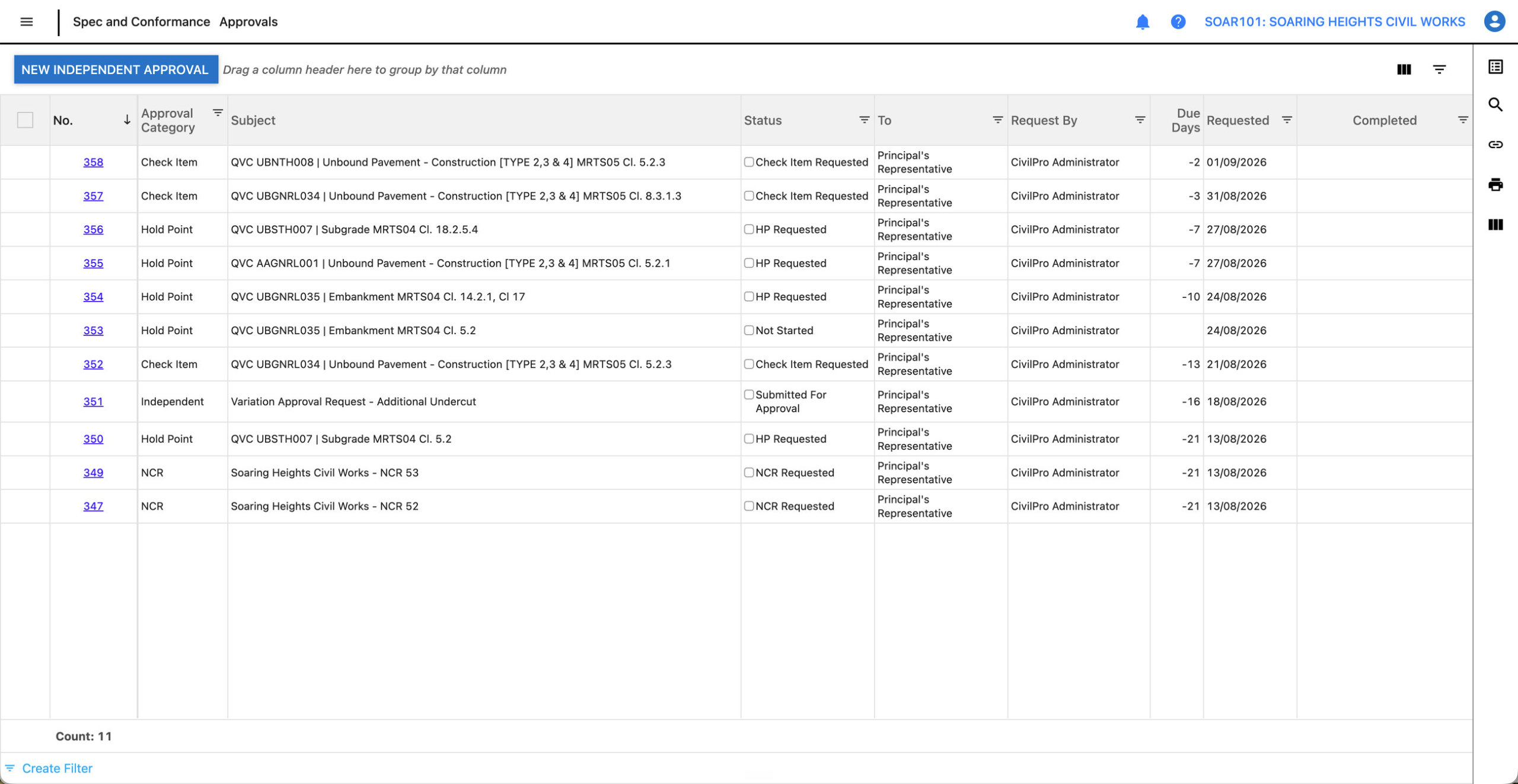
Hold Point and Witness Point requests land with your Client or Superintendent the moment your team raises them. They review, approve and sign — in-app, on any device, with the full audit trail kept against the Lot.
- ✓ Client and Inspector seats are free
- ✓ Approval workflows configurable per contract
- ✓ Every action logged against the Lot
Paperless checklists, captured at source
Engineers, Supervisors, testing subcontractors and surveyors all contribute records directly — no transcription, no chasing, no version drift. The QA hub fills itself as the work happens.
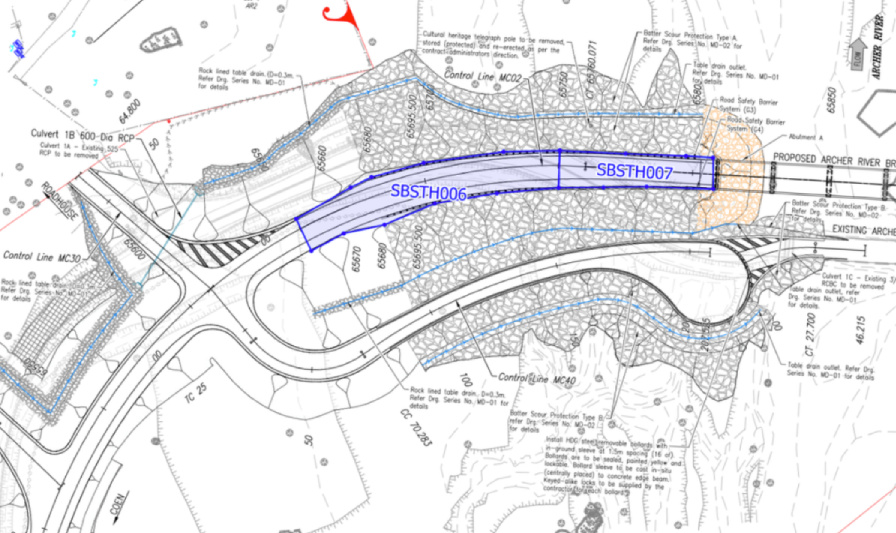
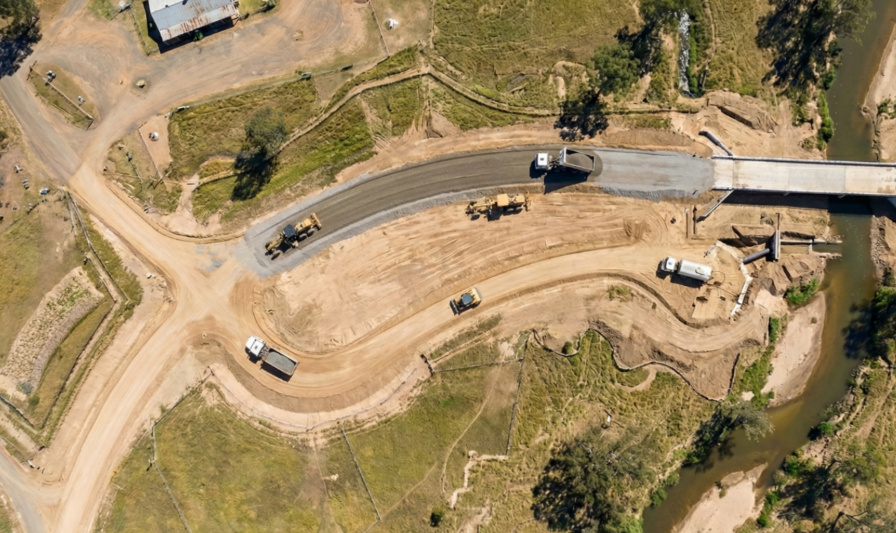
The drawing and the ground, in the same place
Import the design drawing and register it against the site. Lots are then marked out over real coordinates, so the register knows where each parcel physically sits rather than only what it is called. Drag to compare.
What the industry says
"CivilPro's adaptability to a variety of project styles, sizes, and complexities has been instrumental in its widespread adoption across BMD's diversified portfolio."
"CivilPro is built from the ground up to be sensitive to all the needs of infrastructure projects, from scalable interfaces for all stakeholders to bespoke tools for complex civil work."
"On a 600-lot road repair project, CivilPro completely transformed the way we managed the work. Sorting repairs by type and street saved a huge amount of time."
Built by Engineers, for Engineers
"CivilPro wasn't retrofitted to work for civil construction — it was built specifically for it, by engineers." Dennis Gascoigne started building CivilPro as a project engineer in 2001. Twenty years on, it's the industry standard for Lot-based QA.
- Familiar construction workflows, not generic forms
- People across the industry already know how to use it
- Single-tenant Azure database, hosted in Australia
- Web and Desktop apps, one shared dataset

Still being built, with the people using it
CivilPro is developed and maintained in Australia by a small team. The distance between a Site Engineer saying "this is awkward" and a developer looking at it is short, and that is deliberate.
Requests go to the people who build it
Awkward workflows raised on a call, in a training session or in a support ticket are written up as development items. Nobody is asked to accept a workaround as the final answer.
Scoped openly, not quietly shelved
Where a request suits more than one contractor we say so, and we are equally direct about what already works today, what would need building, and what sits outside what CivilPro should be.
Shaped by where the work is going
Spatial Lot mapping, structured handover data and feeding QA records into the Client's own document system were all things customers needed before they were features.
Feeds wherever it needs to go
Feeds into the systems your projects already run.
Oracle Aconex
Lot Summaries land as linked Documents.
Teambinder
QA records flow to your Client's DMS.
API
Everything in the web UI is available via API.
PowerBI & DXF
Reporting connectors and spatial exports.
It's time to end paper-based QA
Join the contractors, Councils and asset owners running Lot-based QA the modern way.
